
Best Transaction Coordinator Software in 2026: 8 Tools Compared
We make Nekst, one of the tools on this list. Here's a fair look at the transaction coordinator software TCs actually shop for, and who each one fits best.
The best transaction coordinator software depends on the work you do every day. If you want AI to read the contract and build your tasks, with a client portal and one shared conversation per deal, start with Nekst or ListedKit. If you run a brokerage that needs compliance review, forms and commission accounting, Paperless Pipeline, SkySlope or BoldTrail BackOffice will likely fit better.
Full disclosure: we built Nekst, so read our section with that in mind. Everything we say about the other tools comes from each company's own website as of October 2026, and we left out anything we couldn't confirm there. We don't list prices because they change too often, so each section links to that company's pricing page instead.
What to look for in transaction coordinator software
Most TCs aren't shopping for "more software." They want fewer missed dates, fewer "any update?" texts, and a way to take on more files without more hours. Before you compare logos, decide which of these jobs matters most to you:
- Contract intake. Does it read the purchase contract and pull the dates and parties for you, or do you key them in?
- Workflows that follow the dates. Do task templates adjust by market and deal type, and do due dates move when the closing date moves?
- Communication. Can you send pre-written emails and texts from your own address, and keep agents, lenders, title and clients updated in one place?
- Client experience. Is there a portal or app where clients can see where their deal stands without calling you?
- Compliance and back office. Do you need document review, e-signature or commission accounting built in, or is that handled somewhere else?
If you want a deeper walkthrough of these questions, our guide to choosing the right transaction management software covers them in more detail.
Transaction coordinator software compared at a glance
- Nekst. Built for (in their words): TCs, agents, teams and brokerages. Stands out for: AI contract reading, workflows by market and deal type, client portal and Client app, one conversation per deal. Best fit: TCs and teams who want tasks, emails and client updates in one system.
- ListedKit. Built for (in their words): In-house TCs, admin teams, agents, teams and brokers. Stands out for: AI contract reading, document checks at intake, built-in e-signature, email routing to the right deal. Best fit: TCs who want AI to handle intake and document checks.
- Open To Close. Built for (in their words): Real estate professionals. Stands out for: Customizable platform with task templates, automated follow-ups and a client portal. Best fit: Teams that want to build their own setup from the ground up.
- Paperless Pipeline. Built for (in their words): Independent brokerages, franchise offices, teams and TCs. Stands out for: Checklists, two-stage compliance review, commissions and AI contract data extraction. Best fit: Brokerages where compliance and commissions run the show.
- SkySlope. Built for (in their words): Agents and brokerages. Stands out for: Forms, e-signature, audits, back-office accounting and an optional done-for-you TC service. Best fit: Brokerages that want forms, signatures and books from one vendor.
- AFrame. Built for (in their words): TCs, agents and brokers. Stands out for: A CRM plus transaction management, task templates and branded client portals. Best fit: TCs who want CRM and transactions in one place.
- TCDocs. Built for (in their words): Independent TCs up to busy offices. Stands out for: Task lists from contract dates, scheduled email templates, Google, Dropbox and Dotloop connections. Best fit: Independent TCs who want a focused task and email tool.
- BoldTrail BackOffice. Built for (in their words): Brokers and brokerage operations. Stands out for: Commission plans, accounting ledgers, agent billing and payouts, plus checklists and e-signature. Best fit: Brokerages that need back-office accounting first.
The 8 best transaction coordinator software tools
1. Nekst
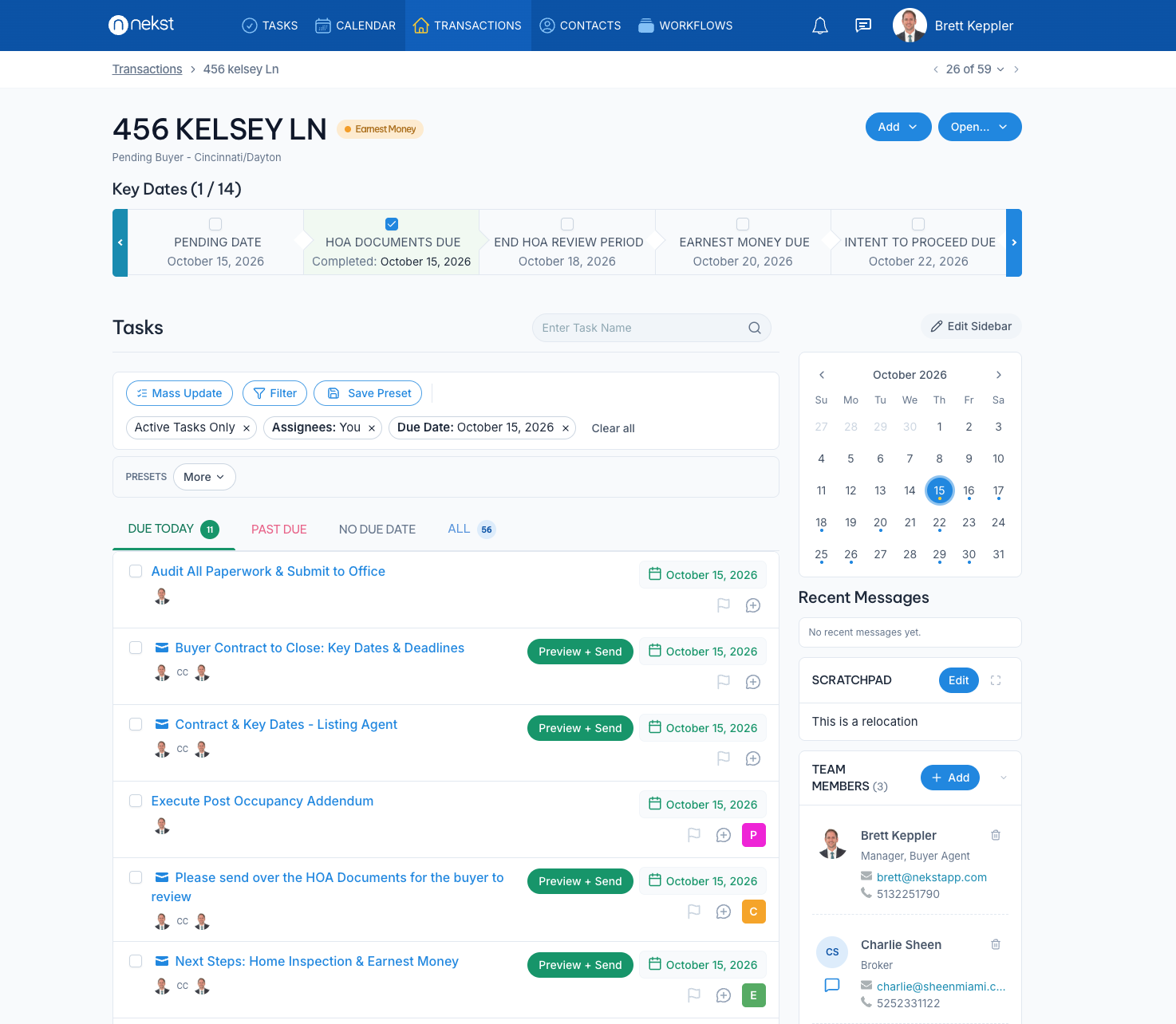
Nekst is real estate transaction management software built for transaction coordinators, agents, teams and brokerages. You upload a purchase contract, Nekst reads the dates and parties, and it builds the transaction's tasks from pre-set workflows for your market and deal type. You can customize those workflows, assign tasks by role, and when a date changes, the tasks shift with it.
On the communication side, you send pre-written emails and texts from your own email address, with custom reminders, open tracking and AI email writing with smart tags. Every transaction gets a Client Portal website with the timeline, key dates, parties, shared notes and documents, and clients and agents can follow along in the free Nekst Client app. The Communication Hub keeps one conversation per transaction for your team and the transaction parties, and anyone you @mention can reply by email. We wrote about why that matters in One Shared Conversation for Every Deal.
Nexi, our AI assistant, answers questions about a transaction, and there are mobile apps, document storage and iCal and Google Calendar integration. Solo Lite lets you try Nekst free on your first 5 transactions.
Best for: TCs and teams who want contract intake, workflows, client updates and deal communication in one system. Not the best fit if you need built-in commission accounting or a full compliance audit trail for a brokerage; look at Paperless Pipeline or BoldTrail BackOffice for that. Nekst pricing
2. ListedKit
ListedKit describes itself as built for in-house transaction coordinators and admin teams, with pages for agents, teams, brokers and attorneys too. Its AI assistant, Ava, reads purchase agreements and pulls out dates, parties and contingencies, and it checks documents at intake for missing signatures, mismatched dates and blank fields. ListedKit also includes e-signature (Ava Sign), routes incoming email to the right deal, drafts update emails for review, and syncs deadlines to your calendar.
Best for: TCs who want AI to do the heavy lifting on contract intake and document checks. ListedKit says it works without templates or pre-setup, so if you'd rather build detailed, customized workflows by market and deal type, compare that against Nekst or Open To Close. Nekst vs ListedKit · ListedKit pricing
3. Open To Close
Open To Close calls itself a fully customizable transaction management platform for real estate professionals. You get task templates with automated follow-up emails or texts when a task is completed, alerts for overdue tasks, email and text templates with merge fields, custom fields and user permissions. Its document tools let you merge and split files and receive documents by email, and its portals give buyers, sellers, agents or anyone you choose access to the transaction, with iOS and Android apps.
Best for: Teams that like to design their own system and want lots of control over fields and templates. We didn't see AI contract reading on Open To Close's site, so if that's a priority, compare it with Nekst or ListedKit. Nekst vs Open To Close · Open To Close pricing
4. Paperless Pipeline
Paperless Pipeline positions itself as transaction management software for brokerages, from independent offices to franchise and commercial firms, with roles for broker-owners, TCs, compliance and operations. It applies checklists and task templates by transaction type, side, status and office, with deadlines tied to contract dates and automatic reminders. It also offers AI contract data extraction, a two-stage document review with required-document gates and an audit trail, and commission tracking for splits, caps and fees. For signatures it connects to DocuSign and Dropbox Sign.
Best for: Brokerages where compliance review and commissions matter as much as the task list. A solo TC or a small team may find it more than they need. Nekst vs Paperless Pipeline · Paperless Pipeline pricing
5. SkySlope
SkySlope covers transaction management from contract to payout, with smart checklists, automated auditing, pre-loaded MLS and association forms, DigiSign e-signature, an offers tool and Books for commission disbursement and back-office accounting. It also offers SkyTC, a done-for-you transaction coordination service that handles paperwork, deadlines and broker checklists for agents and brokerages.
Best for: Brokerages that want forms, e-signature, compliance and accounting from one vendor, and agents who would rather hire out TC work through SkyTC than run it themselves. If you're a TC looking for a daily workflow and client communication tool, compare it with the TC-focused options above. Nekst vs SkySlope · SkySlope pricing
6. AFrame
AFrame describes itself as a T/CRM, a CRM and transaction management system in one, built for transaction coordinators, agents and brokers on multi-user teams. It includes plug-and-play task templates with automatic date calculation and calendar sync, branded 24/7 portals for buyers and sellers, analytics, roles and permissions, and API and Zapier connections.
Best for: TCs and teams who want their CRM and transactions in the same tool. We didn't see AI contract reading on AFrame's site, so weigh that if contract intake is where your time goes. Nekst vs AFrame · AFrame pricing
7. TCDocs
TCDocs says it's built for everyone from the independent TC handling 5 to 10 transactions a month to offices running hundreds. It builds task lists per agent or office with due dates calculated from mutual acceptance and closing dates, sends email templates filled with transaction data and scheduled around contingency dates, and connects to Google Calendar, Google Drive, Dropbox and Dotloop.
Best for: Independent TCs who want a focused task and email tool and already keep documents in Google Drive, Dropbox or Dotloop. We didn't see contract reading or a client portal on TCDocs' site. Nekst vs TCDocs · TCDocs pricing
8. BoldTrail BackOffice (formerly Brokermint)
BoldTrail BackOffice is the next generation of Brokermint, and it's a back-office system first. It handles commission plans with splits, fees and sliding scales, a full chart of accounts and ledgers, a QuickBooks connection, agent billing and next-day ACH payouts, plus transaction checklists, notifications, forms and e-signature, agent onboarding and reporting.
Best for: Brokerages that need commission and accounting tools at the center, with transaction checklists alongside. It isn't built around a TC's daily task list and client updates, so many brokerages pair a back office like this with a TC tool. Nekst vs BoldTrail BackOffice · BoldTrail BackOffice packages
Which transaction coordinator software fits your business?
Independent TC with a handful of agents. You need speed on intake and a repeatable process for every agent you support. Nekst, ListedKit and TCDocs all fit here; the deciding question is whether you want AI to read contracts (Nekst, ListedKit) and whether your agents' clients should get a portal (Nekst).
In-house TC on a real estate team. Your agents and clients want updates without chasing you. Look for workflows that assign tasks by role, a client portal, and one place for deal conversations. Nekst and Open To Close are built for that kind of setup, and AFrame adds a CRM if you want both in one place.
Small or mid-size brokerage. Start with what the broker is accountable for. If it's compliance review and commissions, Paperless Pipeline, SkySlope or BoldTrail BackOffice should be on your list. If it's agent productivity and the client experience, Nekst's brokerage setup is worth a look.
Agent who wants the TC work done for you. SkySlope's SkyTC is a service, not just software. You can also hire an independent TC, many of whom run their business on the tools above.

How to test TC software before you switch
Demos look great on clean sample deals, so run one of your own. Upload a real contract from your market and see how much of it comes through correctly, then change the closing date and watch what happens to your tasks. That one test tells you more than any feature list.
Next, send a client update the way you actually would and look at it from the client's side. Then ask who on your team will log in every day, and make sure the tool works for them, not just for you. If you're coming from another system, ask what moves over and how long setup takes before you commit.
FAQ
What is transaction coordinator software?
Transaction coordinator software is a tool that tracks every step of a real estate deal from contract to close. It holds the key dates, tasks, documents and communication for each transaction, so a TC can manage many files at once without relying on spreadsheets and sticky notes.
What is the best AI transaction coordinator software?
On their own websites, Nekst, ListedKit and Paperless Pipeline each say they read or extract data from purchase contracts. Nekst uses that to build your tasks from workflows by market and deal type, ListedKit pairs it with document checks and e-signature, and Paperless Pipeline pairs it with brokerage compliance and commissions.
What is a good Open To Close alternative?
It depends on why you're switching. If you want AI to read contracts and build your tasks, look at Nekst or ListedKit. If you want a CRM in the same system, look at AFrame, and if you need brokerage compliance and commissions, look at Paperless Pipeline.
Is there free transaction coordinator software?
Nekst's Solo Lite lets you try Nekst free on your first 5 transactions. For other tools, check each company's pricing page, since free plans and trials change often.
Is transaction coordinator software good for small brokerages?
Yes, as long as you match the tool to the broker's priorities. Brokerages focused on compliance and commissions tend to choose Paperless Pipeline, SkySlope or BoldTrail BackOffice, while brokerages focused on agent workflows and client updates tend to choose a TC-first tool like Nekst.
Do I still need a TC if I have transaction management software?
Software handles the dates, reminders and routine emails, but someone still has to own the deal and solve problems when they come up. The right tool lets one TC handle more files with fewer mistakes; it doesn't replace the judgment a good TC brings.