
The Group Text Is Retired: Real Estate Transaction Chat Now in Nekst
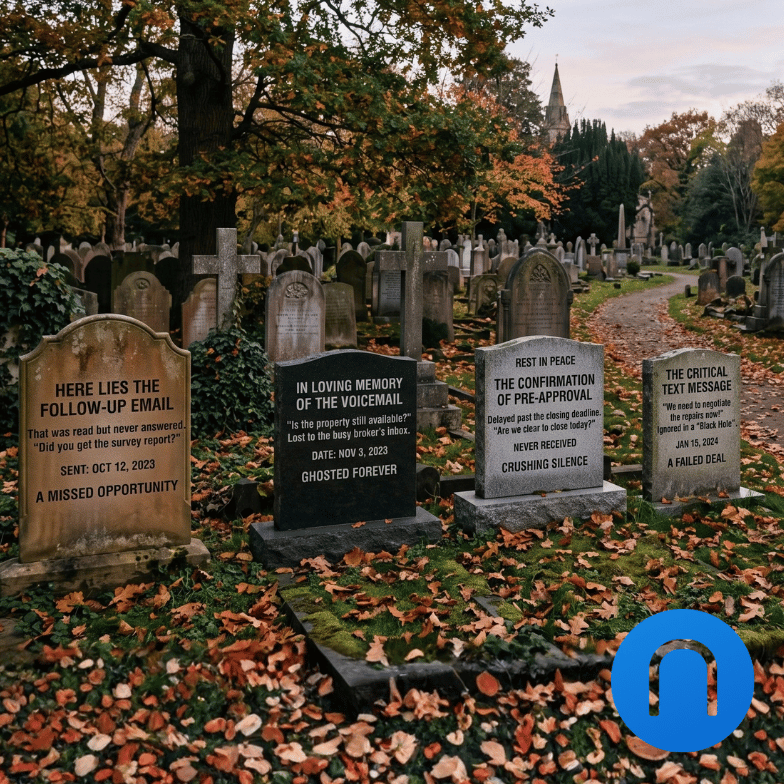
Every deal has a group text, and every group text is a black hole: answers go in, nobody else can get them back out. Here's a better way to improve communication, add transparency, and scale your business.
Think about how communication actually happens on a real estate transaction.
The buyer texts the agent. The agent texts the TC. The lender emails the TC, but not the agent. The listing agent calls the buyer's agent, who relays half of it to the team.
Every one of those is a real conversation about the same deal. None of them are in the same place, and nobody on the transaction can see all of them.
That works right up until it doesn't. A team member is in a showing and can't be reached. Or worse, they go on vacation, and the answer the lender gave last Tuesday is sitting in a text thread on a phone that's at the beach.
The rest of the team can't find it. The client asks again. Someone re-asks the lender.
Why group texts break down on real estate transactions
To be fair, a group text works great in the moment. Everyone has a phone, everyone knows how to use it, and replies come fast. The problems show up later.
You can't find anything. Text is contact to contact, not deal to deal. Your thread with a repeat client covers three transactions, two referrals, and a birthday. When you need the one message about the appraisal on the second deal, you're scrolling through years of history to find it.
Your AI assistant can't help with what it can't see. If you ever want an assistant to actually answer "what did the lender say about the closing date," those conversations have to come off your personal device and onto the transaction. As long as they live in your text app, no software can work with them.
New team members start with nothing. When a TC or assistant joins, they can't be added to a group text and read what came before. When someone leaves, every deal conversation on their phone leaves with them.
The transaction file has the contract, the tasks, and the timeline. It's never had the conversation that explains any of it.
The Communication Hub fixes that by putting the conversation where the deal is: on the transaction itself, visible to everyone who's part of it.
Text history belongs to the person and the phone, not the business.
What the Nekst Communication Hub is
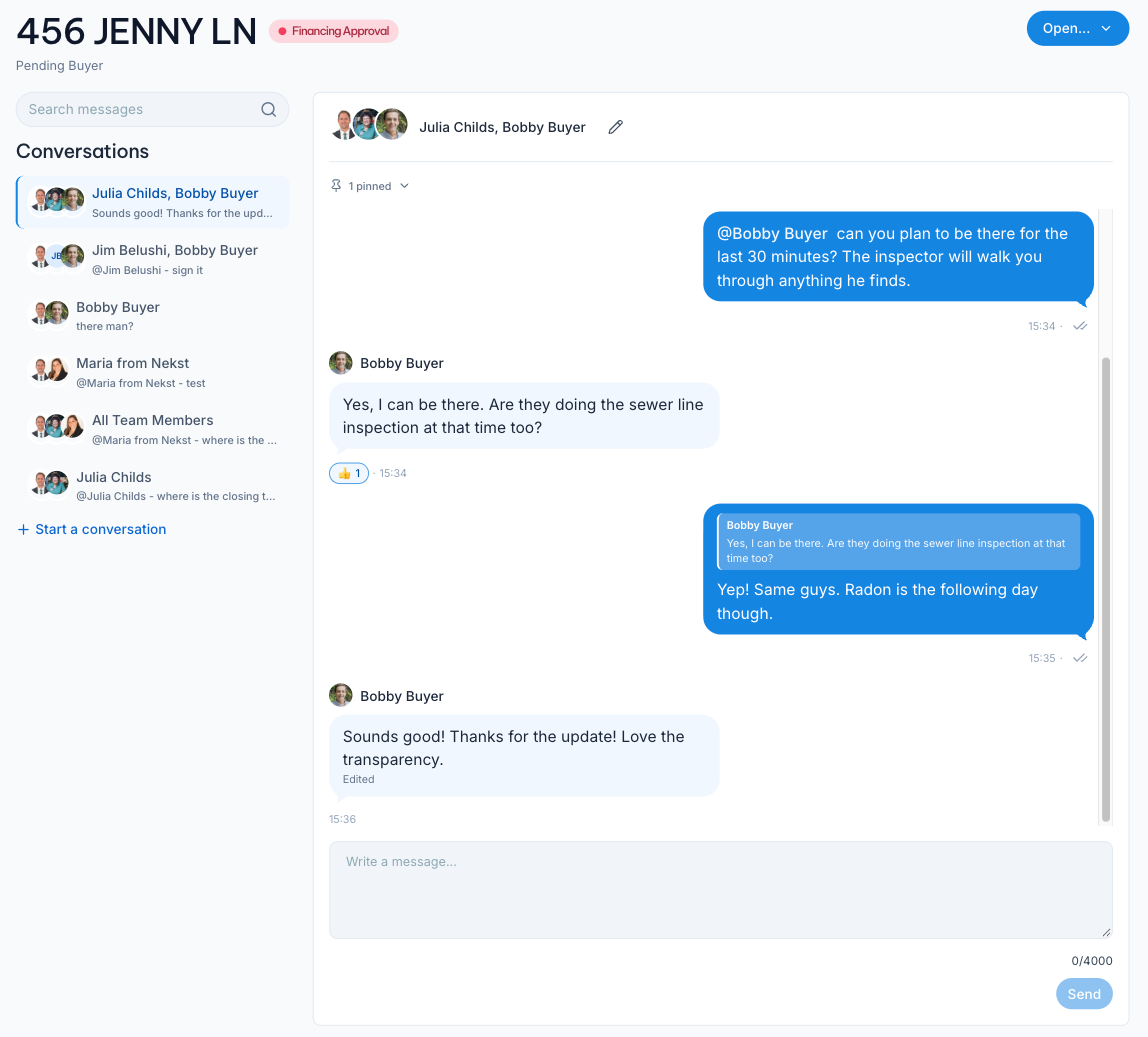
The Communication Hub is a set of conversations that live on each transaction in Nekst. Here's a quick look:
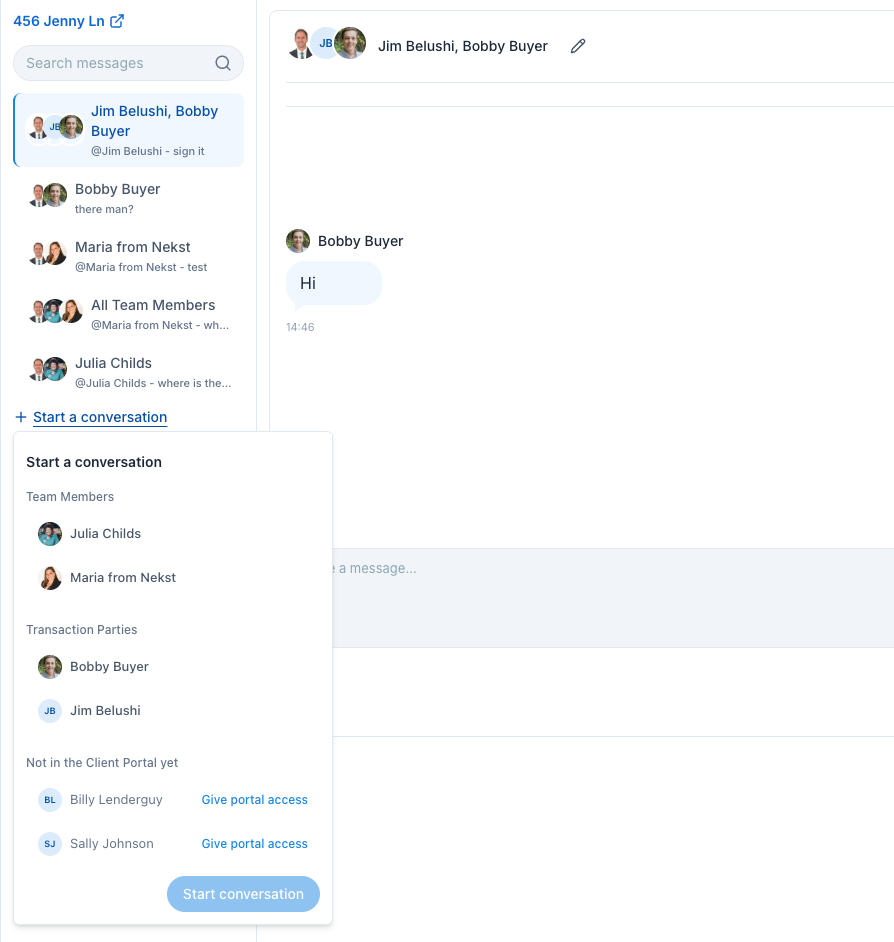
Each conversation is defined by who's in it. A transaction might have one for your internal team, one with you and the buyers, and one with the full seller side. You only see the conversations you're a member of.
Your internal conversation is already there. The first time you open the Hub on a transaction, Nekst creates a conversation called All Team Members with everyone assigned to that deal. Assign someone later and they're added. Unassign them and they're removed.
One conversation per group. If you start a conversation with people who already have one together, Nekst opens the existing thread instead of creating a second one. There's never a "which thread was that in?" moment, because the same group of people always lands in the same place.
Same thread everywhere. Your team reads and replies from the Nekst web app or the Nekst mobile app. Your clients use the Nekst Client app, where the feature is simply called Messages. Everyone sees the same conversation, in the same order, attached to the same transaction.
If you've used Slack, you'll recognize the shape. The difference is your clients are in it, and it's attached to the transaction.
It's not a separate messaging tool you have to remember to check. It sits next to the tasks, documents, and timeline for the deal, and it's available on every Nekst plan.
It's also the first piece of something bigger. The Hub is the foundation for all transaction communication in Nekst, with email and texting planned to flow into the same place. Start putting the conversation on the deal today and every channel we add next lands in the same place.
"My clients are just going to text me anyway"
Probably some of them will. That's fine. The Hub doesn't stop a client from texting you, and you don't have to police it.
But the objection assumes clients want to text. What they actually want is a quick, complete answer, and texting has just been the only way to get one.
Here's why that shifts on its own.
It isn't a new app. Your clients already use the Nekst Client app for the timeline, their tasks, and their documents. Messages is a button on the transaction they already look at. They aren't downloading something to talk to you. They're tapping the deal they're already in.
They're already used to getting answers there. Nekst AI in the Client app already answers "when is my inspection?" or "what do I still need to sign?" instantly, without waiting for a human to be free. Clients who've asked it a question once don't go back to texting for the basics. Messaging is the natural next step: for the questions that need a person, the same app gives them an organized, timely way to reach the team, and the answer stays on the transaction.
They get answered faster. When the buyer asks about the inspection at 4pm and you're in a listing appointment, your TC answers. The client doesn't know or care who replied. They know they got an answer in four minutes instead of two hours.
The answer is next to the question. "Did you get the lender letter?" is a lot easier to answer when the message is sitting on the same transaction as the document. Clients figure this out quickly, especially the ones who are already in the app checking their to-do list.
You set the expectation once. You already tell clients how you work: sign here, upload there, check the portal for what's next. "Questions about the deal go in Messages so my whole team can help you" is one more sentence at onboarding. Most clients hear that as a service upgrade, because it is.
Start with your team. You don't have to move every client on day one. Your internal conversation on every transaction is created automatically, so the team side works immediately with zero client behavior change. Bring the next new client in when you onboard them. A few deals from now, the Hub is simply where transaction conversations happen.
And when a client does text you, nothing is lost. Drop a line in the Hub so the team has it. Better yet, reply in the Hub and let them find the answer where the rest of the deal lives. That's usually all it takes.
Clients don't prefer texting. They prefer the fastest, most complete answer.
What you can do in a Communication Hub conversation
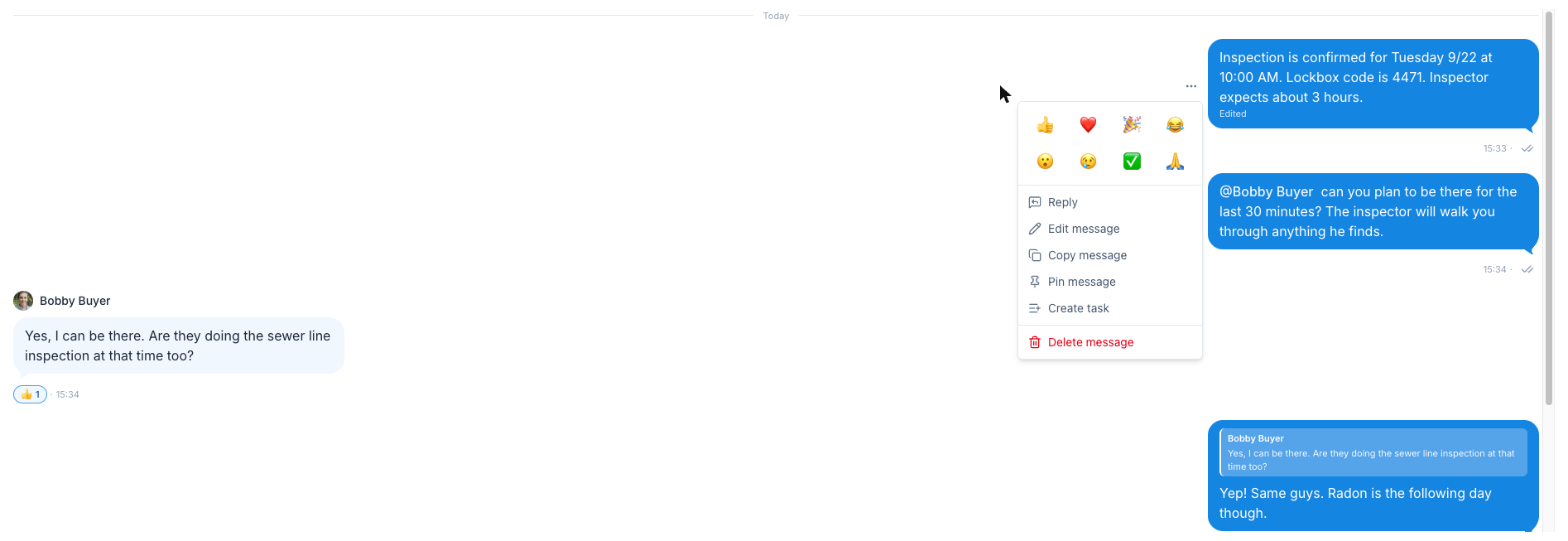
Messages are plain text, up to 4,000 characters. On the web, Enter sends and Shift + Enter adds a line. Beyond that, every message has an actions menu with the tools you'd expect, plus a couple built for real estate.
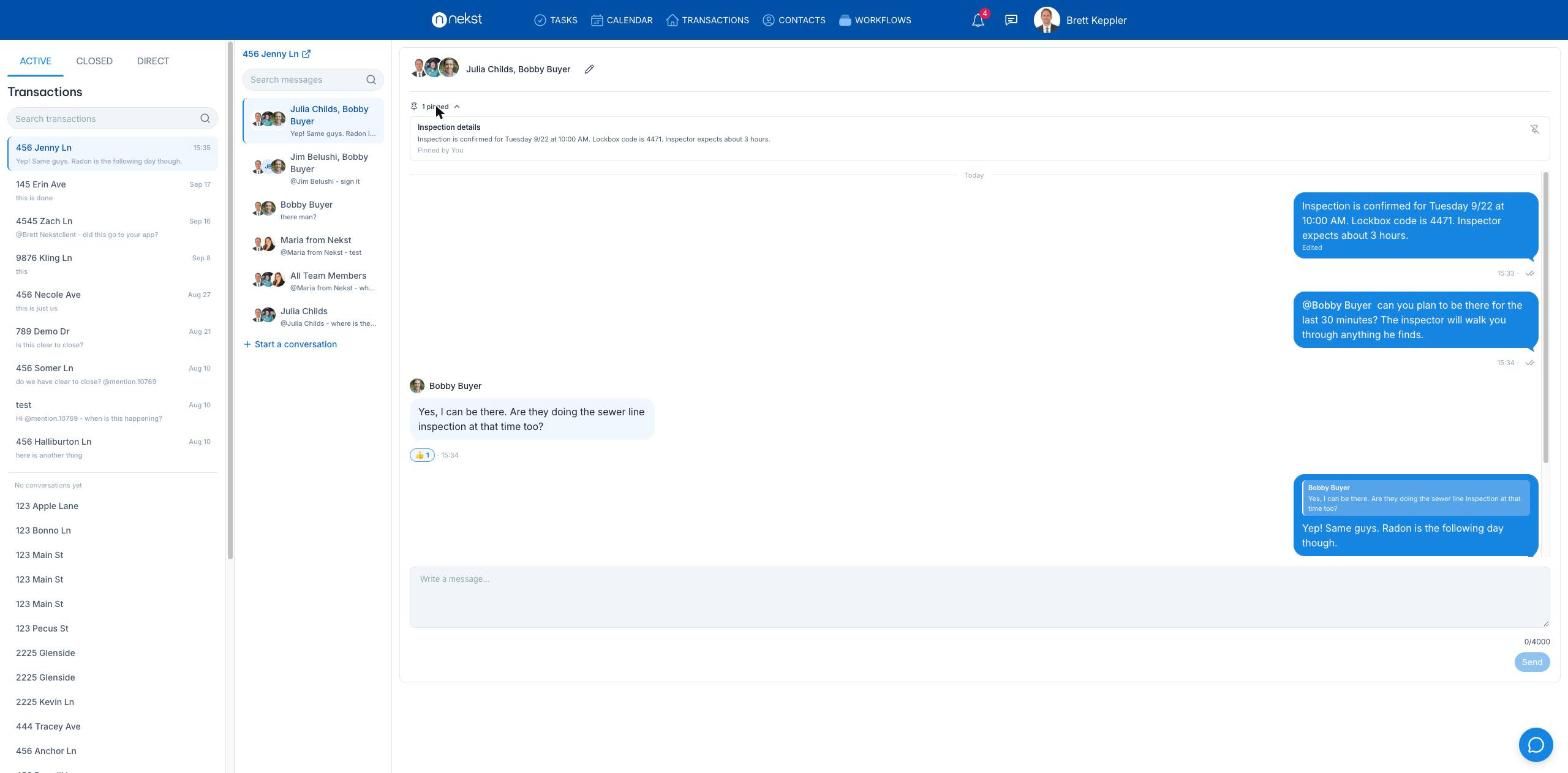
Reply. Your reply lands at the end of the conversation with a quote of the message you're answering, so "yes, that one" always has context. Tap the quote to jump back to the original.
React. Pick from 👍 ❤️ 🎉 😂 😮 😢 ✅ 🙏. A checkmark on "I sent the addendum" is faster than typing "got it," and everyone can see who acknowledged it.
@mention. Type @ and pick anyone in the conversation. They get a notification and an email, and the message is highlighted for them. Use it when "someone should handle this" needs to become "Sarah, can you handle this."
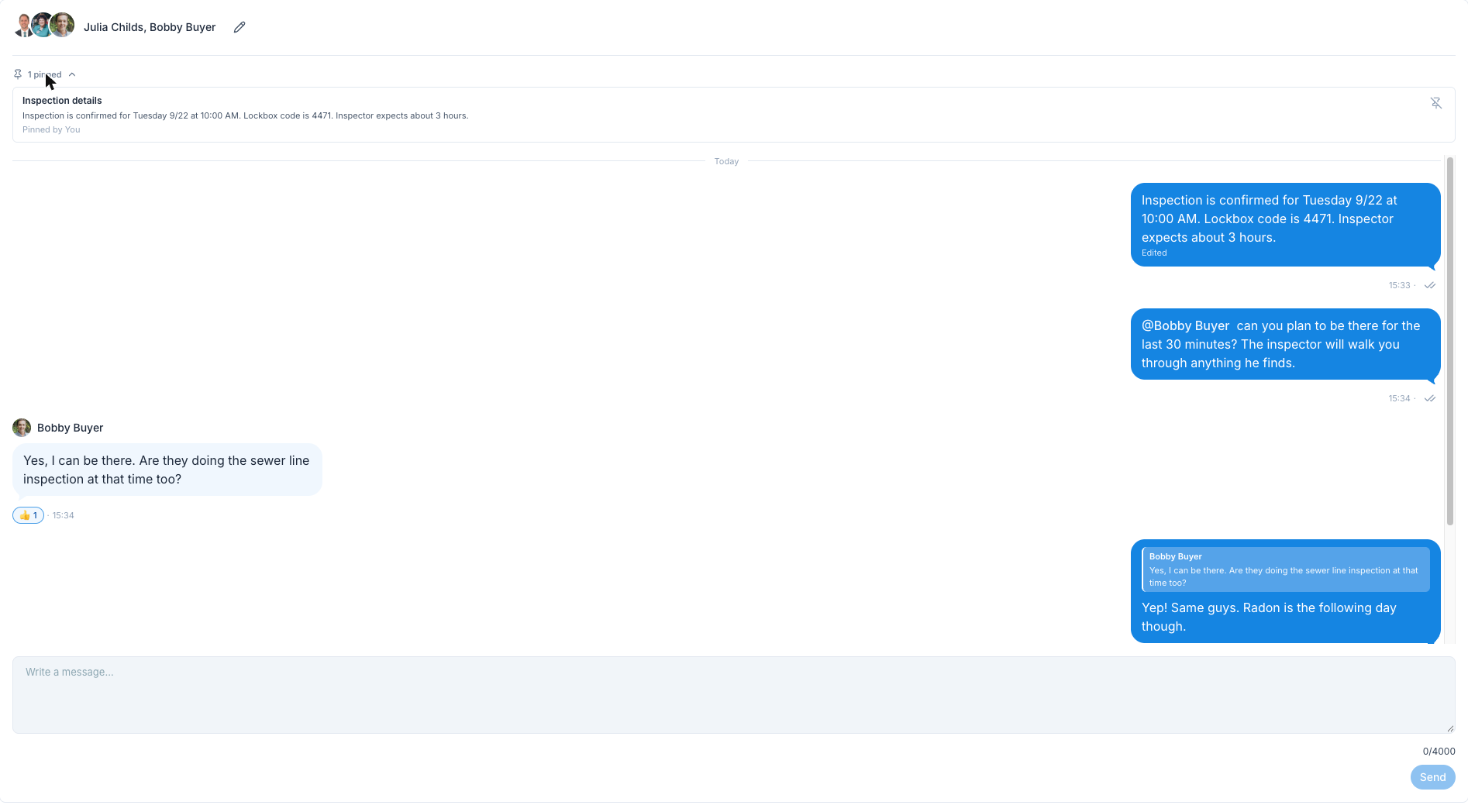
Pin. Pin a message to the top of the conversation with an optional title. Lockbox code, wiring instructions, the title company's contact. The stuff that gets asked three times per deal now has a permanent spot.
Create Task. This is the one that turns conversation into action. From any message on the web or the Nekst mobile app, choose Create Task and Nekst opens a new Standard Task on the transaction with the message text as the description. A client's "can we get the seller to leave the fridge?" becomes a tracked task in two clicks.
Read receipts. Your own messages show a double tick underneath: grey until everyone in the conversation has read it, then blue. Tap it to see exactly who has. No more "did you see my message?"
Edit and delete. Fix a typo in your own message within 15 minutes of sending it (it gets an "Edited" marker). Delete your own messages anytime. Only the author can do either.
Rename a conversation. Conversations are titled by their members, which gets hard to scan when a transaction has several. Any member can name one to make the audience obvious at a glance: "Operations," "Team + Buyer," "Seller Side." You always know who's reading before you type.
Search. From inside a transaction, search looks across every conversation on that deal you're part of, replies included. Each result shows who said it, when, and which conversation it came from, and clicking it opens the thread at that message. The "scroll through years of texts" problem from the top of this post is gone.
Direct messages. You can also message teammates without a transaction. The inbox has a Direct tab for one-to-one and group conversations with your team, and you can start one from the Team Members page.
A text goes to one person. A message in the Hub goes to everyone who can answer it.
Client communication in the Nekst Client app (and only where they belong)
This is the part that separates the Hub from a team messaging tool. Your clients can be in the conversation, on their own phone, without seeing anything they shouldn't.
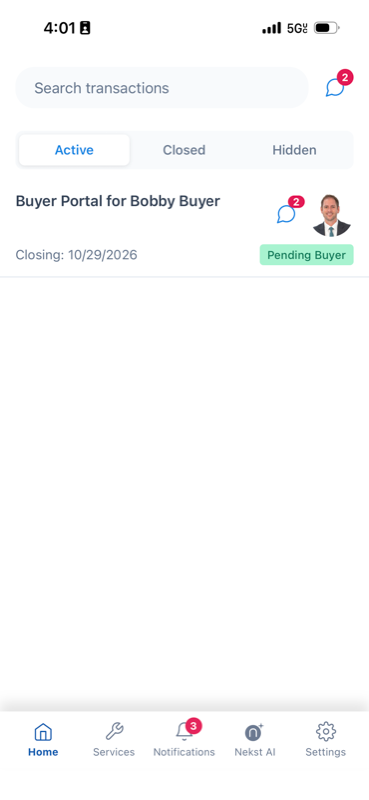
In the Client app, it's called Messages. Clients see a Messages icon at the top of their Home screen and on each transaction card. Tap it, and they're in the conversations they belong to for that deal. Nothing else.
Privacy is by membership. A client only sees conversations they're a member of. Your All Team Members conversation is invisible to them, always. You can talk through a tricky negotiation internally on the same transaction, in the same Hub, and the buyer never sees it. The same rule applies to everyone, including the Account Owner: if you aren't in a conversation, you can't read it.
Who can be added. Any team member assigned to the transaction, and any Transaction Party you've given Nekst Client app access to. That's your buyers and sellers, and it can also be their lender or anyone else you've invited to the portal. Every conversation includes at least one team member, so two clients can't message each other in Nekst without someone from your team in the room.
Clients can start conversations too. A buyer can open a conversation with you, or with you and their co-buyer, or bring their lender in with you if the lender has app access. They pick the people, type the message, and it lands on the transaction like any other conversation.
They'll know when you write. A new message sends a push notification to the client's phone. An @mention also sends them an email. Tapping either one opens the Nekst Client app straight to that conversation, ready to reply. And if they'd rather answer from their inbox, replying to the email posts their response into the conversation.
Adding someone is deliberate. Anyone in a conversation can add another member. Before it goes through, Nekst confirms that the new person will see the full history of that conversation. So you'll never accidentally loop a client into a thread that wasn't written for them.
Access follows the transaction. Unassign a team member, or revoke a client's app access, and they drop out of that transaction's conversations automatically. When a deal closes, the conversations stay on it, under the Closed tab, for as long as you need to look something up.
It shows up where you already work: web, mobile, and Client app
There's no separate app to check. On the web, a Messages icon sits in the header next to the notifications bell with your unread count, and opens an inbox across every transaction you're on. Inside a transaction, the Hub is one click away, and the corner button on every page opens it in a panel so you can answer without leaving what you're doing. On your phone, the same Messages icon is in the header of the Nekst mobile app.
Your phone won't buzz all day unless you want it to. New messages show up in your bell notifications and can push to your phone. Two new settings rows control it: New Hub Message, and When You Are Mentioned in the Hub. Turn off the first and keep the second if you only want to hear about it when someone actually needs you. Details are in Desktop & App Notifications & Mentions.
An @mention or a direct message also sends you an email with a Reply link that opens the conversation. Or just reply to the email, and your response posts into the conversation.
Get the conversation onto the deal now, and everything that comes later lands there too.
How the Hub fits into the future of real estate transaction management
Nekst has always been built on one idea: real estate transaction management software should hold the whole transaction, so the software can do more of the work.
Tasks, deadlines, documents, parties, the timeline. Piece by piece, all of it moved onto the transaction. The conversation never did. It stayed on phones, in inboxes, in memory. And that's exactly the part that explains why the deal is where it is.
The Communication Hub closes that gap. With the conversation on the deal, Nekst finally has the full picture, and everything next is built on it.
First, Nexi joins the conversation. Nexi will take actions in Nekst on your behalf, at your direction: shift a deadline, create a task, send off a custom email, all from inside the conversation. And Nexi will give better answers to everyone in the Hub, your team and your clients alike. Ask what the lender said about the closing date and get it from the thread, not from whoever happens to remember.
Then, we help you manage your email. The lender who emails and the title company that replies-all land on the transaction alongside your team's messages, with nobody forwarding anything.
Finally, texting. The client who texts ends up in the same place too, and the group text officially has nothing left to do.
That's where this is going. A team that can handle more deals in the same hours, because the software knows the whole deal, not just the paperwork.
And it starts with a conversation that lives where the deal lives.
Try it on your next deal
You don't need a rollout plan. Open any active transaction, open the Hub, and your All Team Members conversation is already waiting.
Three things to do in your first week:
1. Pin the lockbox code. Open the internal conversation on a listing, post the code and showing instructions, and pin it. That's the last time anyone on your team texts you to ask.
2. Rename a conversation for its audience. Start one with you and your buyers, name it "Team + Buyer," and send them one message: "Questions about the deal go here so my whole team can help you." Watch how quickly they use it.
3. Message one person directly. Need your TC without looping in the whole team? Open the Direct tab in the inbox, or start one from the Team Members page. Want a private line to just the seller? Start a conversation on the transaction with only the two of you. Either way, it's one message, on the record, with no "did you see my text?" follow-up.
What's not in this release: attachments and images, and typing indicators. Those are on the list.
The Communication Hub is live now on every Nekst plan, on the web app, the Nekst mobile app, and the Nekst Client app. For the full walkthrough, including membership rules, search, and notification settings, see the help article: Communication Hub: Message Your Team and Clients on Every Transaction.
The conversation finally lives where the deal lives. Go retire a group text.
If you're still running your deals on group texts and want transaction coordinator software that keeps the whole conversation on the deal, give Nekst a try.